Weiming Intelligence

Train your AI to learn your judgment.

Work together, and leave your demonstrations and trade-offs behind. From personal knowledge to a model that is genuinely yours.

Personal model training is a planned capability; confirmed knowledge can support your work today.

Upcoming interface preview · Example data Target interface: two options for collecting sign-ups, your judgement, and the experience about to be kept
Two options for collecting sign-ups, the judgement behind the choice, and the experience about to be kept. No measured training results.

Product mechanism

Your work record keeps shaping LinX, through the Pod and your personal model.

You give LinX intent and corrections. LinX works with models, agents and tools, and saves the material, process, results and your trade-offs into the Pod. Pod knowledge supports LinX directly; authorised material is trained and evaluated into a POM, which then takes part in LinX judgements. Xpod carries both the Pod and the POM.

  • You your own standards and trade-offs
  • LinX a collaborator you define
  • AI capability models · agents · tools

Carried by Xpod

  • POD · your records material, experience, knowledge
  • POM · your personal model learns your preferences and judgement

The data, runtime and asset foundation; it does not change who governs model releases.

  1. You LinX intent, demonstration and correction
  2. LinX AI capability delegation and collaboration, with results and feedback coming back
  3. LinX POD · your records material, process, results and your trade-offs
  4. POD · your records LinX facts, knowledge and context
  5. POD · your records POM · your personal model authorised material, training and evaluation
  6. POM · your personal model LinX personalised judgement

works this way today personal model training and application, planned

Illustrative product mechanism; personal model training is a planned capability

The Pod does not only collect AI output. It also keeps the reasons behind your choices, their sources, and the situation you were in. What gets saved is bounded by your choices and authorisation.

Three different things, to show where it helps.

Three short tasks with different purposes, each with its own input and a readable output. All of them are target interface examples, not run records; long-term personal models and autonomous execution are not among them.

Make sense of the week

Upcoming interface preview

Input: a few meeting notes and a progress list.

You paste the material in or attach it; nothing goes and collects your email.

  • Done: the sign-up form is chosen
  • Blocked: the venue has not confirmed
  • Open: whether to reprint the poster

Understand one long document

Upcoming interface preview

Input: one document with a traceable source.

The sources come from the document you supplied; example sources are not retrieval results, and the product page states the actual scope.

  • Three key points
  • The source for each one
  • Two questions still to check

Rewrite a paragraph until it can be sent

Upcoming interface preview

Input: a draft, a recipient and a tone.

It returns a revision; it does not send anything for you.

  • Before: this plan seems fine I guess, take a look
  • After: the plan now follows your last round of comments, with the budget listed separately so you can go straight to the conclusion

The three short examples only show the range. The first one is carried through in full below.

Illustrative example

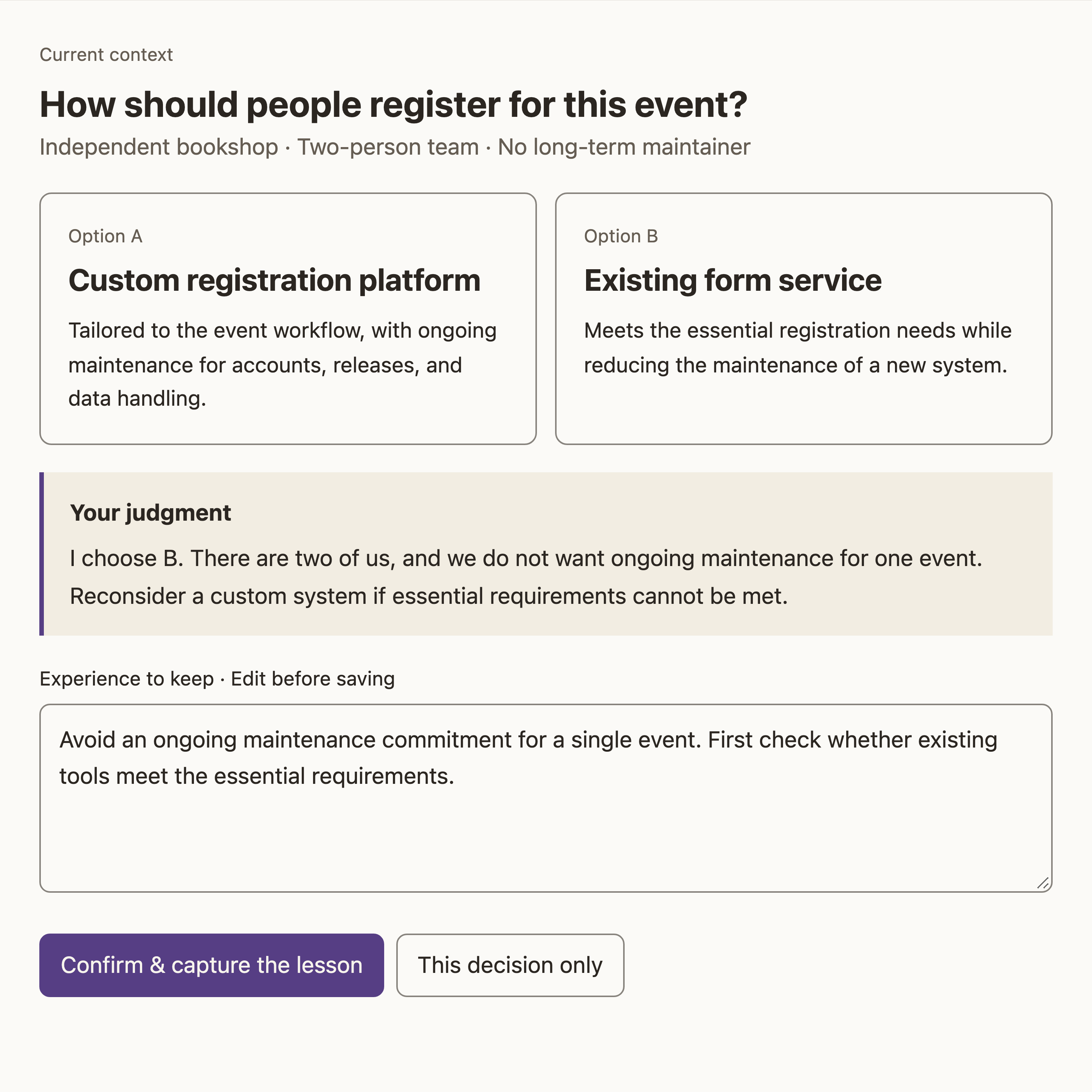
How should this event collect sign-ups?

An independent bookshop, a team of two, nobody to maintain anything long term. Every example here is a design fixture, not a user case.

One choice, and the reason for it

Options
A: a custom sign-up platform. B: an off-the-shelf form.
Your call
“I pick B. There are two of us, and I will not take on long-term maintenance for one event. If the necessary requirements cannot be met, we can look at custom again.”
What you left behind
Do not add long-term maintenance for a single event; check first whether existing tools meet the necessary requirements.
One revision
Before: “prefer the option with the lowest maintenance cost.” After: “check whether existing tools meet the necessary requirements, then compare long-term maintenance effort.” Your reasoning became a condition, and the conclusion followed.

That call becomes a proposed piece of knowledge awaiting confirmation. Until you confirm it, it joins no later task and trains no model.

Type: target interface example (Upcoming interface preview), based on the bookshop fixture in the R5 target spec. Neither the screenshot nor the text is a run record.

Three kinds of growth, three different things.

Records and knowledge, runtime adaptation, and a personal model each have their own success facts, and none of them substitutes for another. Personal model training: planned.

  • Now

    Records and knowledge

    Original records, feedback, judgement cards, sources, conditions, exceptions and revisions. What you can truthfully say is “the record is saved” or “the knowledge is confirmed” — at that point no model has been trained.

  • Now

    Runtime adaptation

    Using knowledge, methods and tools you approved inside a task. What you can truthfully say is “this task used this version of the knowledge”, never that parameters have learned.

  • Next

    Personal model

    An executable model artefact produced by training or adapting on authorised material, plus its evaluation record. Only once training produces an artefact is it a candidate model; whether it gets enabled is a separate decision.

From one correction to one new task.

The same piece of experience goes the whole way: confirm it, decide whether it may be trained on, then test it in a new situation.

  1. Shape it into judgement knowledge

    The “maintenance cost” card keeps the original words, the source discussion, the conditions it applies under, the exceptions, and every revision.

    • Original words and summarised judgement stay separate; a revision never overwrites the original record
    • It can stay a draft, be confirmed, or be withdrawn from later use
  2. Choose what may be trained on

    Next

    Confirming knowledge is not training consent: you select the training material separately, and state the purpose separately.

    • Anything you did not select stays out of training
    • Before it really runs, processing location, resources and cost still have to be checked
  3. Test it on a new task

    Next

    The new situation is scheduling weekly volunteers — it does not copy the answer from the sign-up question.

    • Same base model, same authorised knowledge, with a personal model adaptation added on one side only
    • A candidate is never enabled automatically; with no improvement, the current version stays

Both sides are compared under identical knowledge and tool conditions, and the answers are shown anonymously. There are no measured scores here, and finishing training is never a reason to enable.

Start with the task in front of you.

LinX · you define how it works

Carry your context into the task, and turn what you accepted, changed or rejected into reusable experience.

Xpod · carries your data and model assets

Material, experience, knowledge and task facts stay somewhere you control, with location, authorisation and portability all answerable.

Developers

Connect your own application to the data, starting from deployment, identity and read/write access.

Xpod is the foundation; LinX is the method.

Xpod decides how your data and model assets are carried; LinX decides how you and the AI get the work done.

You do not have to install both: LinX works on its own. Add Xpod when you want records, knowledge and model assets kept with you, or read by other applications.

Only confirmed connections are listed; protocol compatibility does not mean a particular client already supports it.

Xpod · three value groups

  • Data and model assets: where data lives, who may use it, where it came from, how to take it with you, plus model artefacts and version references
  • Personal knowledge that can be understood in common: the ontology answers “what is this, how does it relate”, while the index and Wiki answer “how do I find, read and maintain it”
  • Tasks you keep practising: triggers, Task/Run/RunStep, authorisation, waiting, results and recovery

LinX · three capabilities

  • Work with your context: read knowledge, organise models, agents and tools, wait for your judgement, continue and write back
  • You define how the work is done: goals, standards, capability mix, autonomy and exceptions are all visible and editable
  • Grow from your trade-offs: demonstrations, corrections, acceptances and rejections keep their sources, and are tested on new tasks

Starting takes three steps.

Pick an entry point, connect it following the guide, then do the first thing.

Desktop packages

Both LinX and Xpod publish desktop packages; the download page lists them by platform and chip.

Command-line tool

@undefineds.co/linx is published on npm and runs; the Pod provider can point at your own.

Cloud and self-hosting

The hosted entry point is pods.undefineds.co, with sign-up and quotas as that service currently states them; self-hosting needs Bun 1.3+ or Node 22+.

  1. Pick an entry point

    A desktop package, the command-line tool, or your own deployment; choose by device and habit.

  2. Connect it

    You choose and configure the account and model service, and the credentials stay in your own Pod.

  3. Do the first thing

    Take one small task and carry it through a single decision, reasons included.

A few things people ask before starting.

Each answer gives the fact first; details live behind the links.

LinX or Xpod first? Do I need both?

Not both. Install LinX to get work done; add Xpod when you want records, knowledge and model assets kept with you, or read by other applications.

Which devices and ways of running are supported now?

Desktop packages cover macOS Apple silicon, Windows and Linux; macOS Intel has no published build. The command-line tool is on npm and needs you to supply Node.js.

What account or model service do I need, and what does it cost?

You choose and configure the model service, and the credentials stay in your own Pod. The client and the self-hosting code are publicly available; model usage is billed by whichever service you choose, and the hosted service is billed as that service currently states. No prices are predicted here.

What is the difference between my data and what is sent to a model?

Where it is stored and where a request goes are two different things. Data is stored where you chose; with an external model the request goes to that provider.

What works today, and what is still a direction?

Working today: desktop and command-line packages, storage and access, judgement knowledge and task records. Direction: personal model training, and wider autonomous execution. Every target interface on this site is labelled “Upcoming interface preview”.

What you leave behind: where it lives, who can read it, how to take it.

Take the sign-up discussion above. Each question has a concrete answer.

Where it lives

Running locally, it is kept in SQLite and a disk directory on your own machine. With the hosted service, it is kept in the environment you chose.

Who can read it

Only applications you authorise can read it. Permission is granted per application and can be withdrawn at any time.

How to take it with you

Export scope and format follow the documented support. In local mode the data is already your own files, so you can back it up yourself.

Where an external AI request goes is a separate question: where data is stored and which model service receives what are two different things. With an external model, the request goes to the provider you chose.

AI is still undefined. Define it with us.

We came here from an earlier wish. Why we build LinX and Xpod, and where we hope they lead, is written in the letter to whoever finds it.

Start with one thing you have to do today, and leave the choice and the reason behind.